Vibe Coding - 基础配置部分
基础配置
Claude Code
国内CC平替-智谱
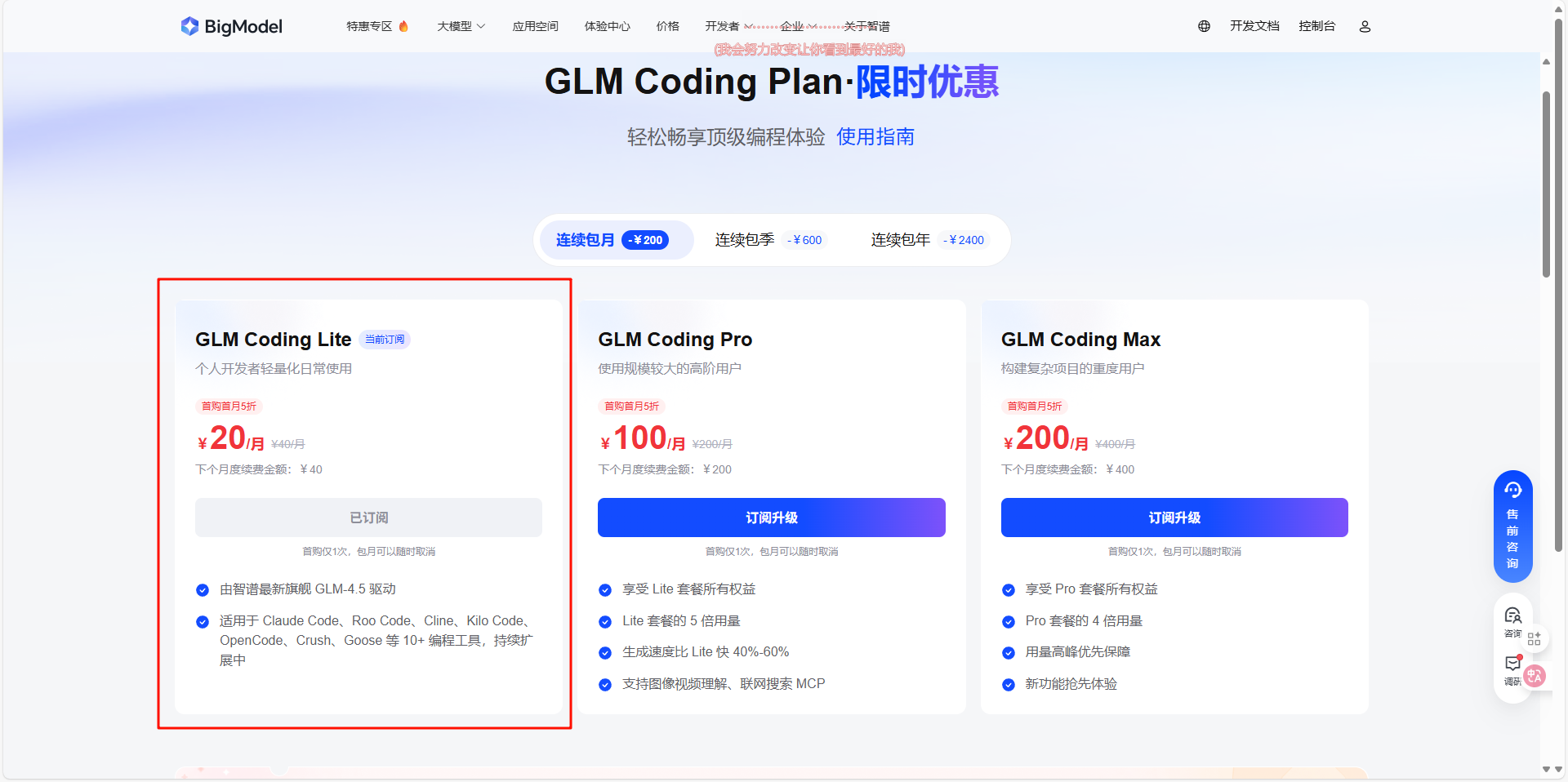
前往点击注册购买包月套餐,推荐lite的包月20块一档的,如果有长期但量不多的需求可以买包年的
据悉:走上面链接注册除了首月半价,还能叠加9折!
注意:只有pro以上的用户配有图像识别和联网搜索
推荐理由:不做类似openwebui这种大项目,够用了,还便宜量大
智谱环境变量配置
截止到2025-09-19的推荐配置
| 变量名 | 设置内容 |
|---|---|
| ANTHROPIC_AUTH_TOKEN | API密钥 |
| ANTHROPIC_BASE_URL | https://open.bigmodel.cn/api/anthropic |
| ANTHROPIC_MODEL | glm-4.5 |
| ANTHROPIC_DEFAULT_HAIKU_MODEL | glm-4.5-air |
视觉MCP配置
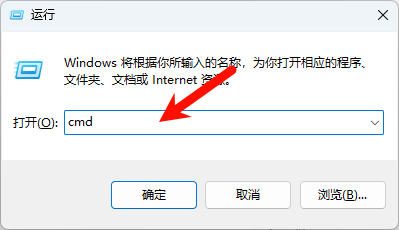
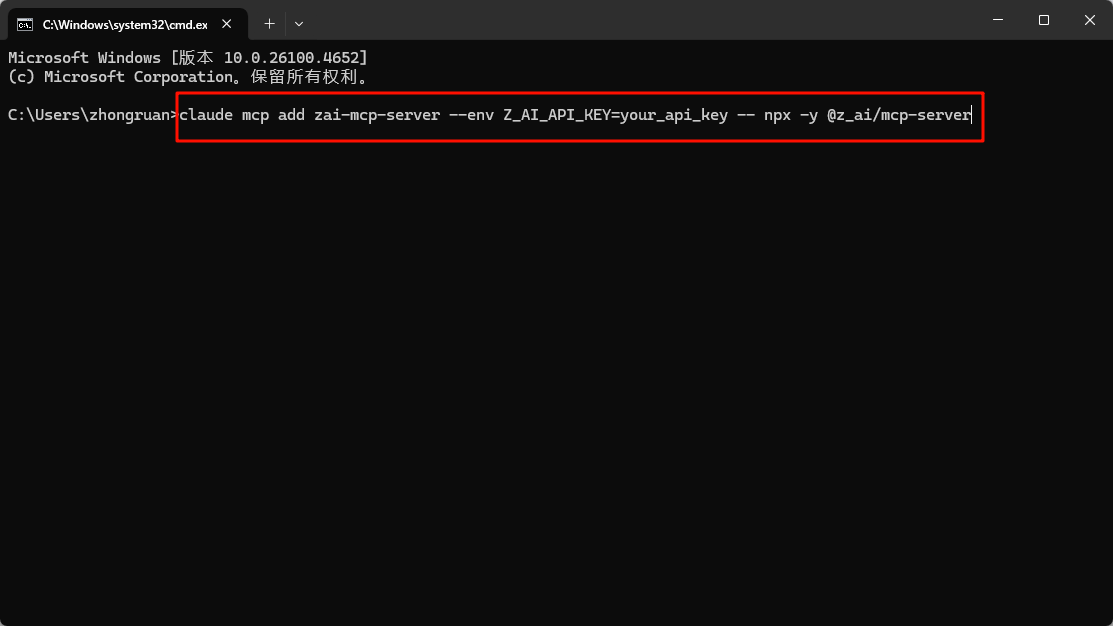
win键+r键,输入cmd,回车,输入claude mcp add zai-mcp-server --env Z_AI_API_KEY=这里改成你的KEY -- npx -y @z_ai/mcp-server
智谱联网MCP配置
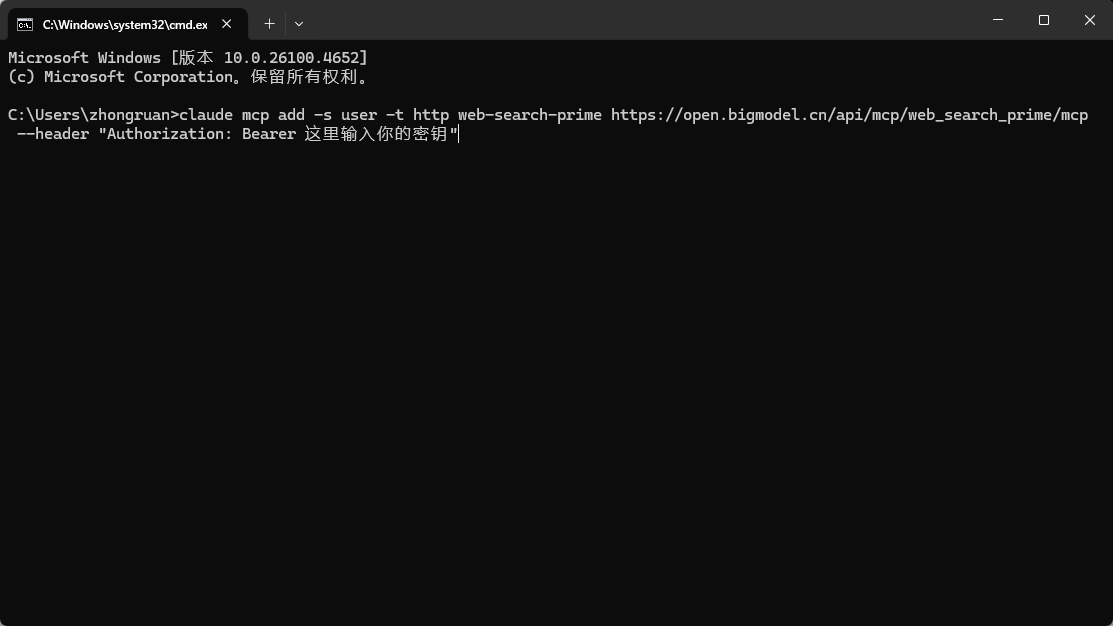
win键+r键,输入cmd,回车,输入claude mcp add -s user -t http web-search-prime https://open.bigmodel.cn/api/mcp/web_search_prime/mcp --header "Authorization: Bearer 这里输入你的密钥"
环境变量
| 变量名 | 设置内容 |
|---|---|
| ANTHROPIC_AUTH_TOKEN | 【使用第三方API必填】API密钥 |
| ANTHROPIC_BASE_URL | 【使用第三方API必填】API地址 |
| ANTHROPIC_MODEL | 默认模型 |
| ANTHROPIC_DEFAULT_HAIKU_MODEL | 后台小任务模型 |
| BASH_DEFAULT_TIMEOUT_MS | bash 命令的默认超时 |
| BASH_MAX_TIMEOUT_MS | 模型可以为长时间运行的 bash 命令设置的最大超时 |
| BASH_MAX_OUTPUT_LENGTH | bash 输出在中间截断之前的最大字符数 |
| CLAUDE_CODE_MAX_OUTPUT_TOKENS | 为大多数请求设置最大输出令牌数 |
| MCP_TIMEOUT | MCP 服务器启动的超时时间(以毫秒为单位) |
| MCP_TOOL_TIMEOUT | MCP 工具执行的超时时间(以毫秒为单位) |
用量查看
安装
npx ccusage@latest使用方法
# 查看每日报告
ccusage
ccusage daily

# 查看每周报告
ccusage weekly

# 查看每月报告
ccusage monthly

# 查看不同会话的报告
ccusage session

# 按每 5 小时计费窗口进行查看
ccusage blocks

# 实时监控
ccusage blocks --live
添加到 Claude Code 的状态栏
打开~/.claude/settings.json,添加
{
    "statusLine": {
        "type": "command",
        "command": "npx ccusage statusline"
    }
}
CodeX
也可以看一下这篇帖子:点击访问原帖
配置文件
文件目录~/.codex/auth.toml
"OPENAI_API_KEY": "你的第三方api_key"文件目录~/.codex/config.toml
model = "gpt-5-codex" # Codex 0.36.0 支持
model_reasoning_effort = "high" # 使用最大推理能力
model_reasoning_summary = "detailed" # 在终端显示详细的推理总结(ctrl+T查看)OpenAI 没有推理过程,只有推理总结
model_verbosity = "high" # 不懂,总之要拉满
model_supports_reasoning_summaries = true # 强制启用推理总结,针对于自定义 API KEY 的

[model_providers.供应商名称]
name = "供应商名称"
base_url = "基础URL,注意带后缀,可能是V1也可能是其他的,遵循供应商api文档"
wire_api = "responses或者chat,视供应商情况填写,优先responses"
requires_openai_auth = true

hide_agent_reasoning = false # 允许显示更多的 AGENT 内部思考过程

disable_response_storage = true # 不允许 OpenAI 服务端存储你的对话

approval_policy = "never" # 配了但没用,总之先放着,建议通过 /approvals 配置
sandbox_mode = "workspace-write" # 配了但没用,总之先放着,建议通过 /approvals 配置
# allow network in workspace-write mode
[sandbox_workspace_write]
network_access = true

# 下面为MCP的例子,超时可以设置startup_timeout_ms = 60000
[mcp_servers.MCP名称]
command = "方式"
args = ["参数"]
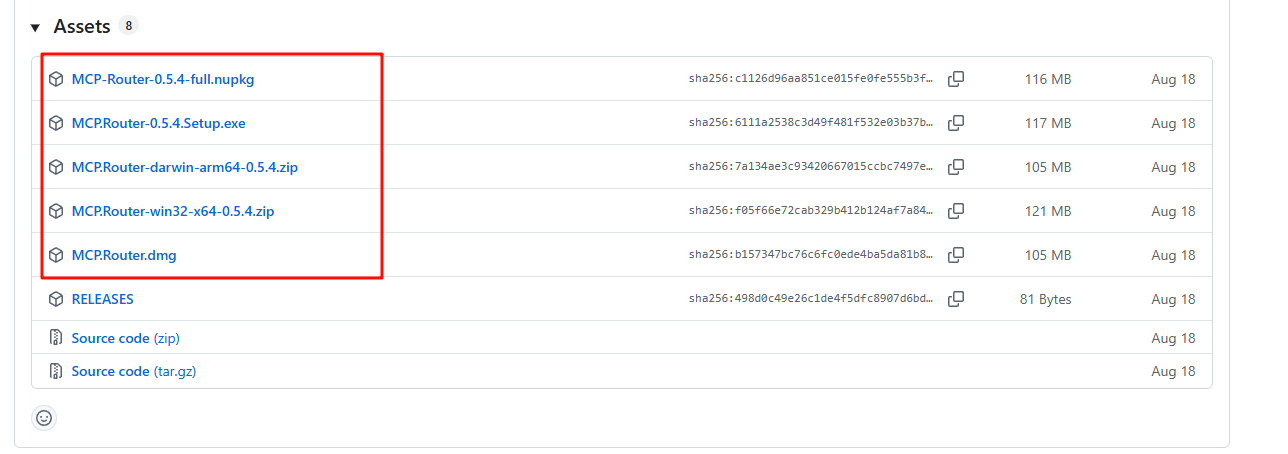
通过开源项目配置MCP
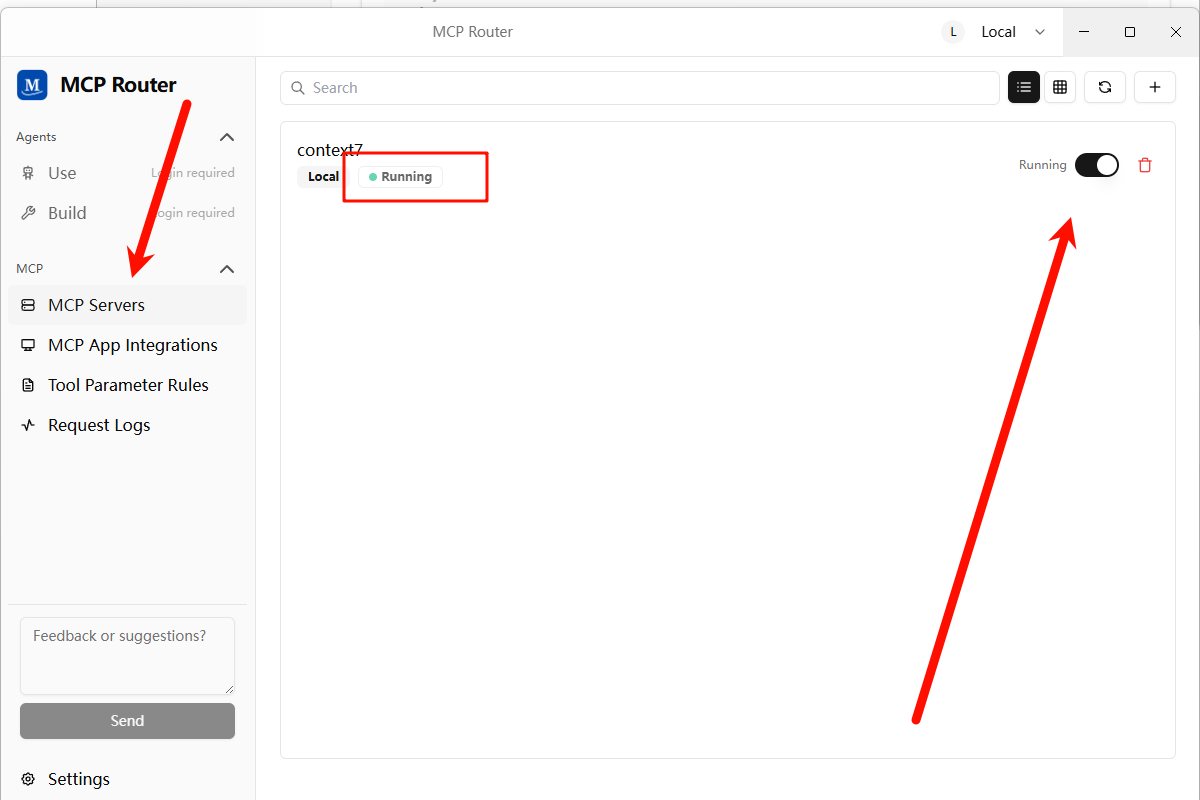
下载后打开 MCP Servers,通过不同的方式添加 MCP 服务
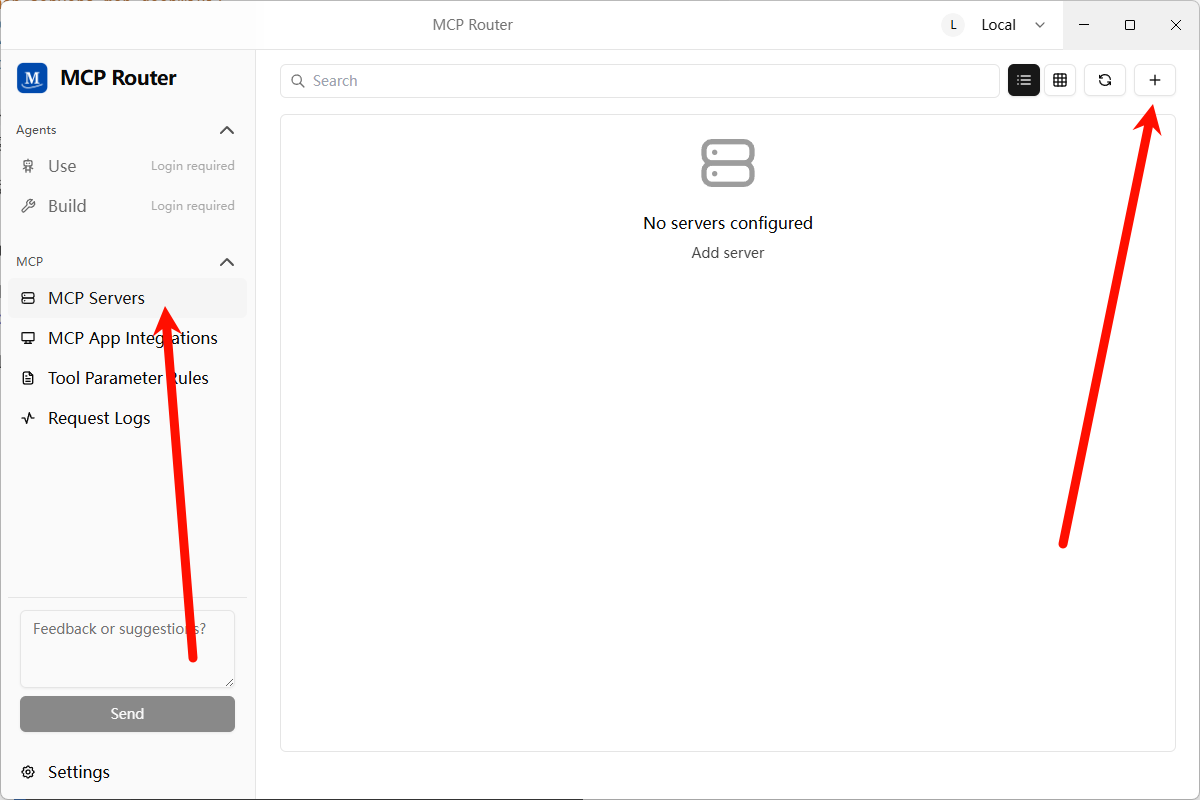
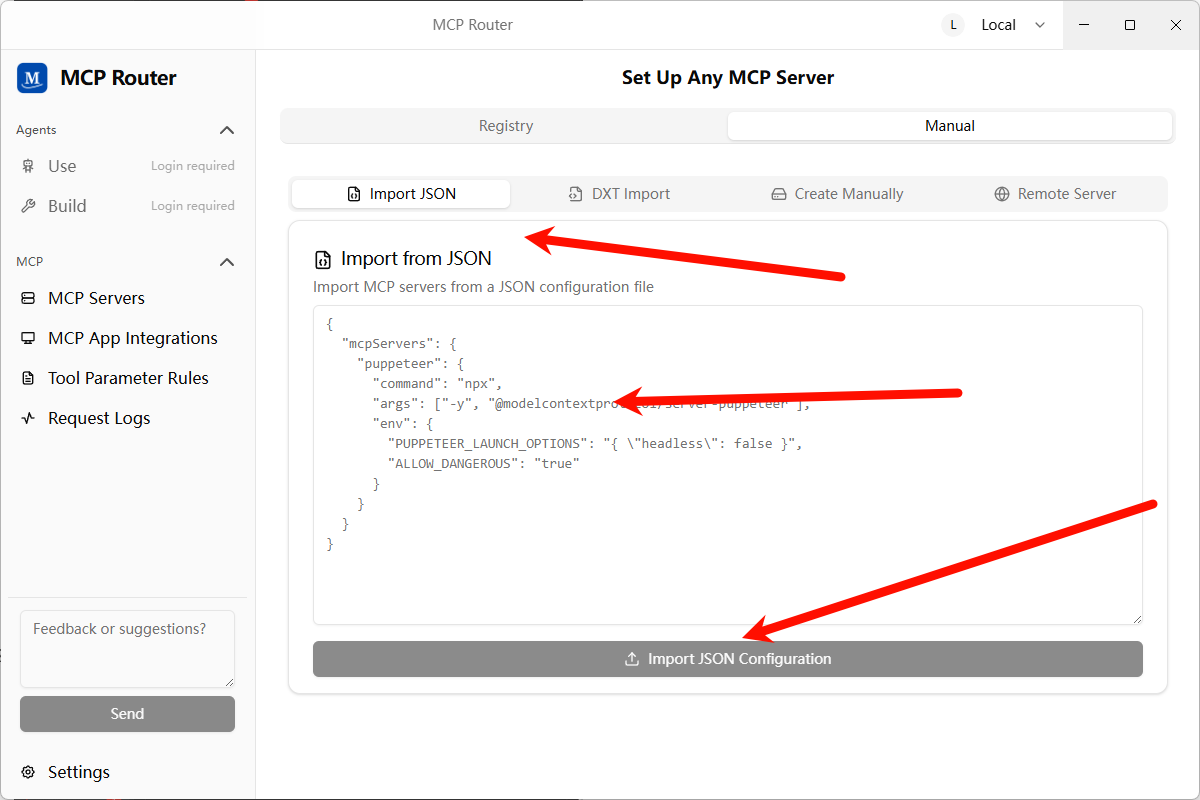
添加成功提示
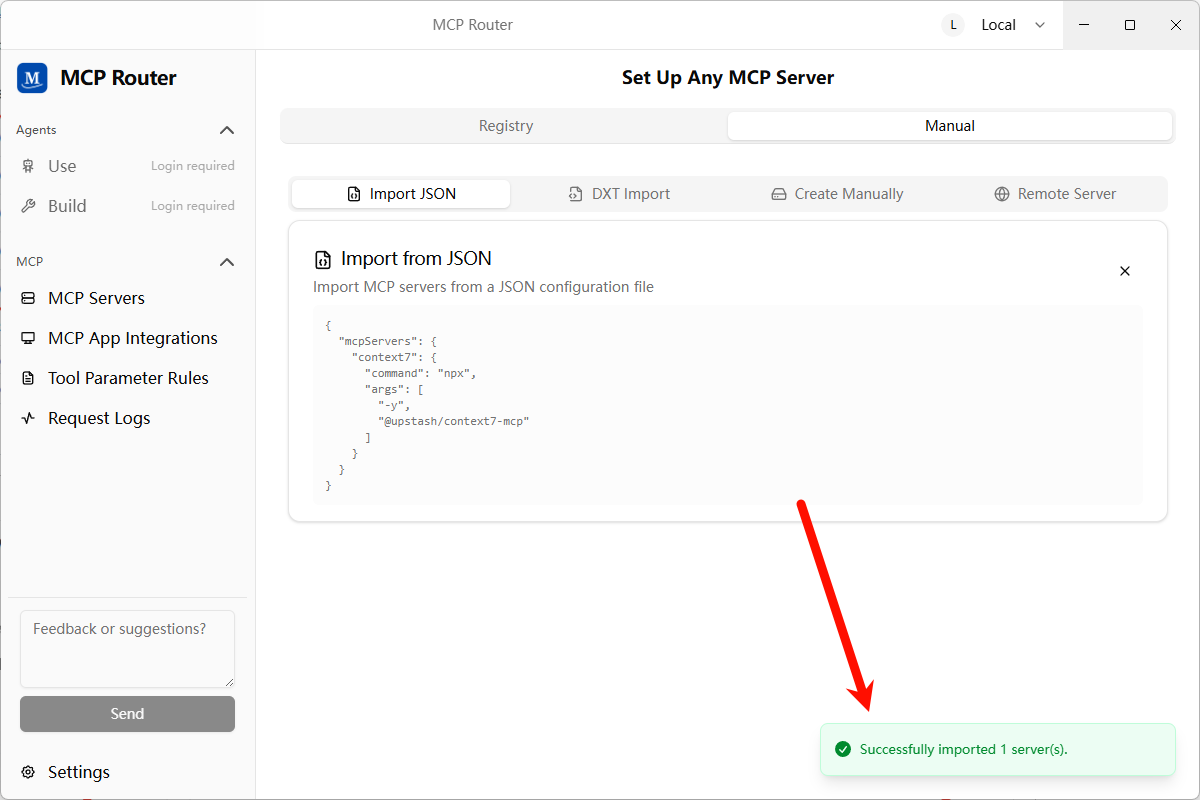
添加 MCP 服务完成后,需要点击开启按钮,这个同时也会测试服务是否能正常使用
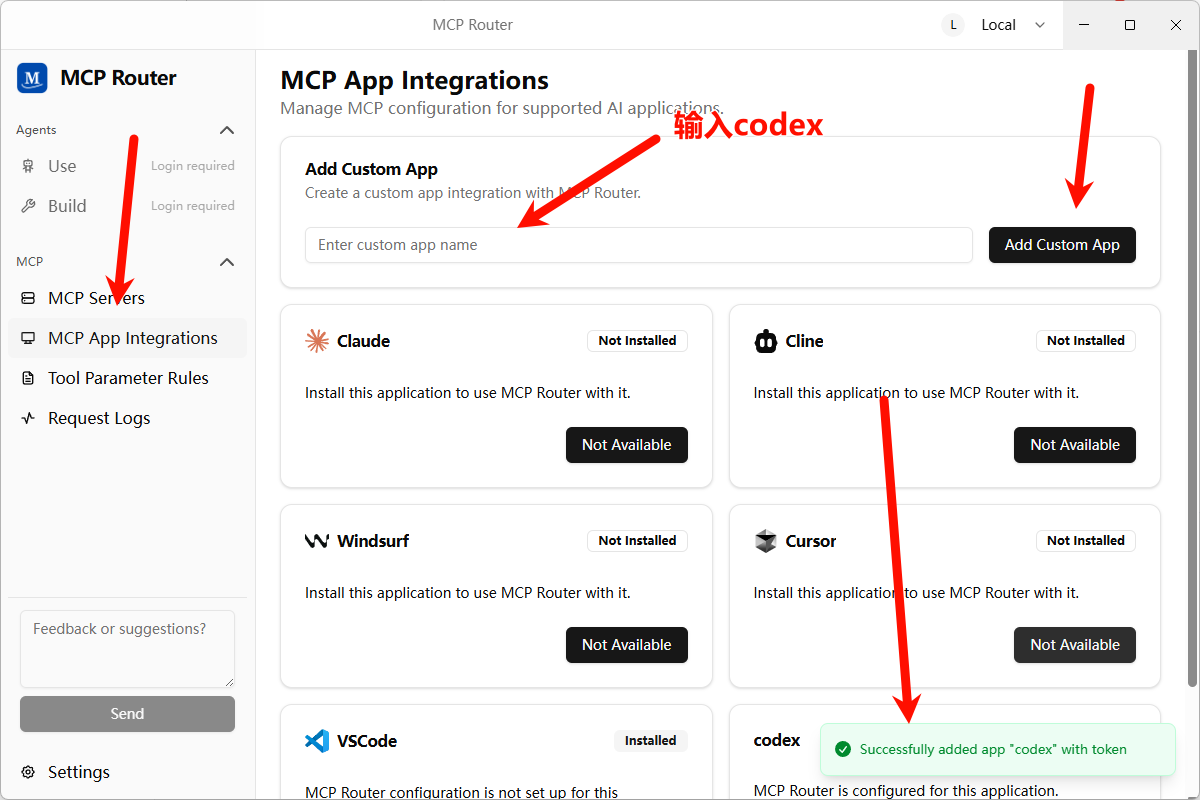
添加 MCP App,因为 MCP Router 没有集成 codex,需要添加自定义应用并使用它的 token
安装 mcpr-cli 服务,因为使用的是 mcpr-cli 服务的 connect 操作,需要额外安装一个 mcp
npm install -g mcpr-cli@latest配置 mcp-router 到 Codex
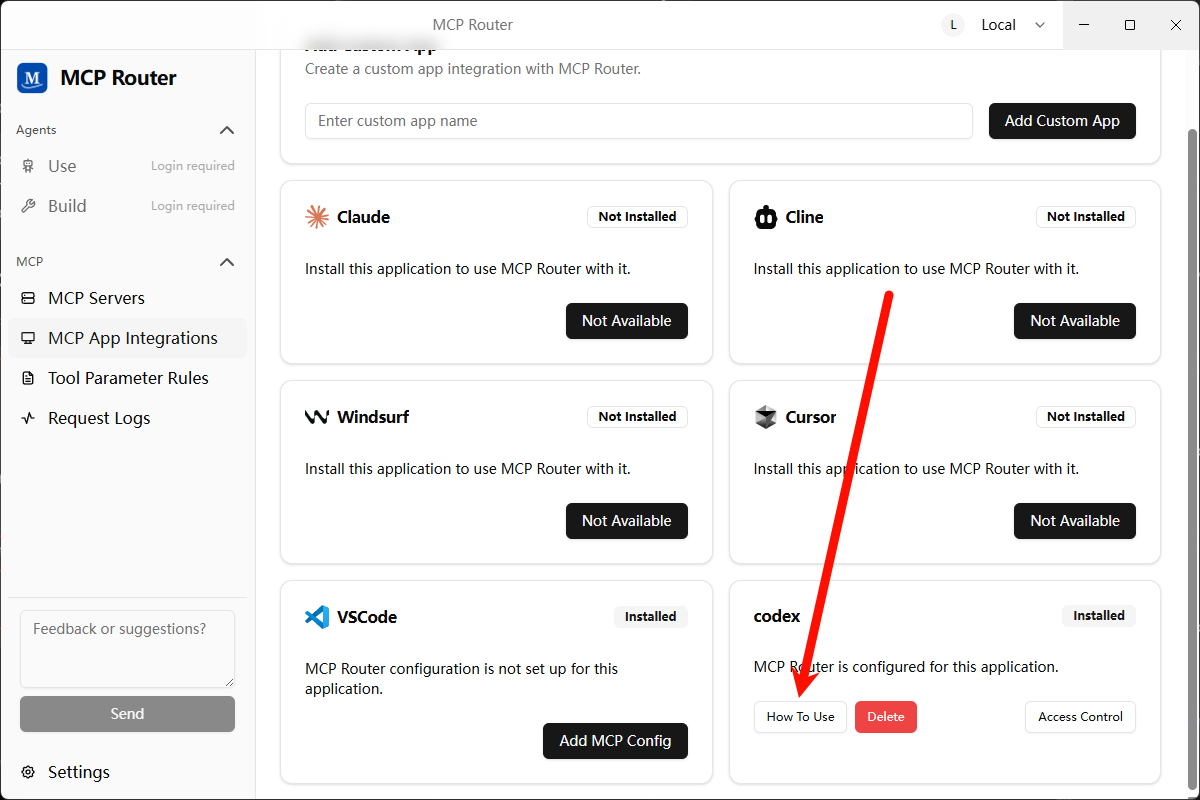
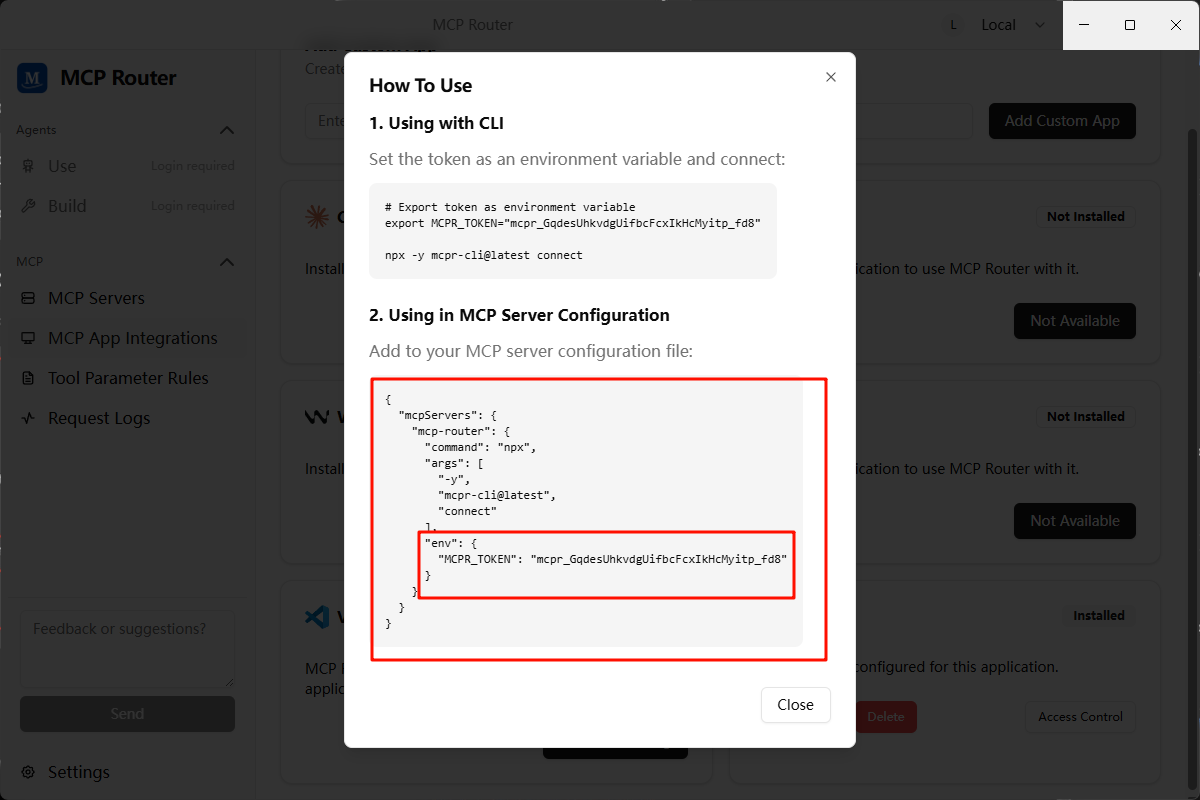
在
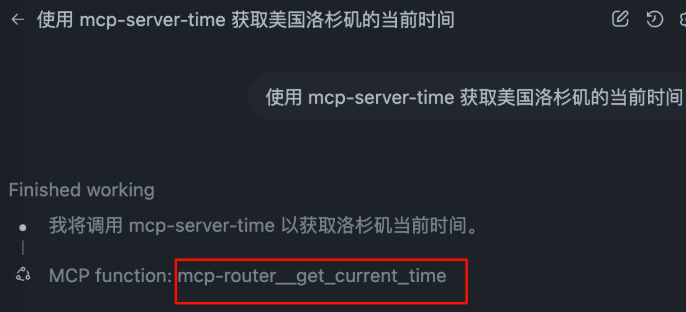
config.toml中配置添加如下:toml# 只需要配置单个的 mcp-router 服务即可 [mcp_servers.mcp-router] command = "npx" args = ["-y", "mcpr-cli@latest", "connect"] env = { MCPR_TOKEN = "mcpr_iF8iNeMZft1Zv-iYF2ur50L5W4xXUMuX" }再测试 mcp 服务可用性,同样适用 mcp-server-time 测试
AGENTS.md
在实际操作过程中,发现只声明可用工具而不引导具体用法,经常会偏离预期,因此建议复制如下完整的配置,按需调整。
## Tool Priority

- Filename search: `fd`.
- Text/content search: `rg` (ripgrep).
- AST/structural search: `sg` (ast-grep) — preferred for code-aware queries (imports, call expressions, JSX/TSX nodes).

### AST-grep Usage (Windows)

- Announce intent and show the exact command before running complex patterns.
- Common queries:
  - Find imports from `node:path` (TypeScript/TSX):
    - `ast-grep -p "import $$ from 'node:path'" src --lang ts,tsx,mts,cts`
  - Find CommonJS requires of `node:path`:
    - `ast-grep -p "require('node:path')" src --lang js,cjs,mjs,ts,tsx`
  - Suggest rewrite (do not auto-apply in code unless approved):
    - Search: `ast-grep -p "import $$ from 'node:path'" src --lang ts,tsx`
    - Proposed replacement: `import $$ from 'pathe'`

### Search Hygiene (fd/rg/sg)

- Exclude bulky folders to keep searches fast and relevant: `.git`, `node_modules`, `coverage`, `out`, `dist`.
- Prefer running searches against a scoped path (e.g., `src`) to implicitly avoid vendor and VCS directories.
- Examples:
  - `rg -n "pattern" -g "!{.git,node_modules,coverage,out,dist}" src`
  - `fd --hidden --exclude .git --exclude node_modules --exclude coverage --exclude out --exclude dist --type f ".tsx?$" src`
- ast-grep typically respects `.gitignore`; target `src` to avoid scanning vendor folders:
  - `ast-grep -p "import $$ from '@shared/$$'" src --lang ts,tsx,mts,cts`
  - If needed, add ignore patterns to your ignore files rather than disabling ignores.
系统通知
Codex 支持在任务执行完成后执行自定义事件,我们可以利用这一特性实现 Windows 系统弹窗通知。
Codex 文档见 https://github.com/openai/codex/blob/main/docs/config.md#notify
- ~/.codex/config.toml
notify = ["powershell.exe","-NoProfile","-ExecutionPolicy","Bypass","-File","C:\\Users\\<username>\\.codex\\notify.ps1"]- ~/.codex/notify.ps1
param(
  [Parameter(Mandatory = $true)]
  [string]$json
)

# 解析 JSON(Codex 把一段 JSON 作为 argv[1] 传进来)
try {
  $payload = $json | ConvertFrom-Json
} catch {
  $payload = @{}
}

$title = 'Codex'
$msg   = $payload.'last-assistant-message'
if (-not $msg) {
  if ($payload.type) {
    $msg = "Event: $($payload.type)"
  } else {
    $msg = 'Codex has an update.'
  }
}

# 可选:截断过长文本,注意只用 ASCII 的三点号,避免乱码
if ($msg -and $msg.Length -gt 240) {
  $msg = $msg.Substring(0,240) + '...'
}

# 只用 Toast,不要任何 Popup 兜底
Import-Module BurntToast -ErrorAction Stop
New-BurntToastNotification -Text $title, $msg | Out-Null
Gemini Cli
环境变量
变量名: GOOGLE_GEMINI_BASE_URL
变量值: https://API地址
变量名: GEMINI_API_KEY
变量值: sk-xxxxxxxxxxxxxxxxxxxxxxxxxxxxxxxxxxxxxxxx
MCP推荐
1. Context7
查询技术规范
ClaudeCode
{
  "mcpServers": {
    "context7": {
      "command": "npx",
      "args": ["-y", "@upstash/context7-mcp"]
    }
  }
}
Codex
[mcp_servers.mcp-deepwiki]
command = "npx"
args = ["-y", "mcp-deepwiki@latest"]
2. Deepwiki
查询开源项目解析
{
  "mcpServers": {
    "mcp-deepwiki": {
      "command": "npx",
      "args": ["-y", "mcp-deepwiki@latest"]
    }
  }
}
3. 互通各家AI-Cli
    "codex": {
      "command": "cmd",
      "args": [
        "/c",
        "codex",
        "mcp"
      ]
    },
    "claude-code": {
      "command": "cmd",
      "args": [
        "/c",
        "claude",
        "mcp",
        "serve"
      ]
    },
    "gemini-cli": {
      "command": "cmd",
      "args": [
        "/c",
        "npx",
        "-y",
        "gemini-mcp-tool"
      ]
    },
4. Desktop Commander
【AI总结生成:】提供本地终端控制、文件系统访问、代码编辑和自动化能力。它可执行命令、搜索文件、分析数据、编辑文本,并与本地进程交互,打造统一的开发操作入口。
{
  "mcpServers": {
    "desktop-commander": {
      "command": "npx",
      "args": [
        "-y",
        "@wonderwhy-er/desktop-commander@latest"
      ]
    }
  }
}
5. Sequential Thinking
【AI总结生成:】用于结构化思维过程,支持分步推理、分支探索与动态修正,适合解决复杂问题或需要保持上下文的任务。
{
  "mcpServers": {
    "sequential-thinking": {
      "command": "npx",
      "args": [
        "-y",
        "@modelcontextprotocol/server-sequential-thinking"
      ]
    }
  }
}
6.serena
【AI总结生成:】提供语义级代码检索与编辑能力,支持多语言,通过符号级操作提升代码理解与修改效率,尤其适用于大型代码库。
ClaudeCode
在你的项目目录下,通过如下命令添加 Serena:
claude mcp add serena -- <serena-mcp-server> --context ide-assistant --project $(pwd)其中 <serena-mcp-server> 是你运行 Serena MCP 服务端的方式。例如使用 uvx 时,命令如下:
claude mcp add serena -- uvx --from git+https://github.com/oraios/serena serena start-mcp-server --context ide-assistant --project $(pwd)ℹ️ Serena 自带一份工具说明文本,Claude 需要读取它才能正确使用 Serena 的工具。从 v1.0.52 起,Claude Code 会自动读取 MCP 服务端的说明。如果你使用的是旧版本,或 Claude 未能成功读取说明,可以手动请求它“读取 Serena 的初始说明”,或运行 initial_instructions 工具来加载说明文本。若要启用该功能,请在配置中显式添加 included_optional_tools。
Codex
Codex 是全局添加 MCP 服务端,而非按项目添加。请将以下内容添加到 ~/.codex/config.toml(如文件不存在请新建):
[mcp_servers.serena]
command = "uvx"
args = ["--from", "git+https://github.com/oraios/serena", "serena", "start-mcp-server", "--context", "codex"]
启动 Codex 后,请激活项目:
Activate the current dir as project using serena如果未激活项目,将无法使用 Serena 的工具!
你可以查看 ~/.codex/log/codex-tui.log 来确认是否有错误发生。
Serena 的仪表盘默认会启动,但由于 Codex 的沙箱限制,浏览器可能不会自动打开。你可以手动访问:
http://localhost:24282/dashboard/index.html⚠️ Codex 有时会错误地显示工具执行失败,即使实际执行成功。这是已知问题,不影响使用。
7. Chrome-Devtools
# Claude Code
claude mcp add chrome-devtools npx chrome-devtools-mcp@latest

# Codex
codex mcp add chrome-devtools -- npx chrome-devtools-mcp@latest

# Gemini CLI

# 编辑Gemini设置文件
   nano ~/.gemini/settings.json
   # 或者使用你喜欢的编辑器
   code ~/.gemini/settings.json

# 添加Chrome DevTools MCP配置:在 settings.json 文件中添加以下配置:

{
     "mcpServers": {
       "chrome-devtools": {
         "command": "npx",
         "args": ["chrome-devtools-mcp@latest"]
       }
     }
   }


 # 带参数的高级配置

 {
  "mcpServers": {
    "chrome-devtools": {
      "command": "npx",
      "args": [
        "chrome-devtools-mcp@latest",
        "--channel=canary",
        "--headless=true",
        "--isolated=true"
      ]
    }
  }
}

#验证配置,输入:Check the performance of https://developers.chrome.com